Open source · MIT · LrC-AVG

Lightroom Autonomous Gateway

An open-source MCP engine that lets an AI edit your photos in Lightroom Classic with the same Develop sliders you'd use, one measured pass at a time. A local engine measures every render for clipping and keeps each pass inside limits. The AI makes the aesthetic calls.

The intro · 1:23 · with music

Example one · a written brief

Tell it what the day felt like

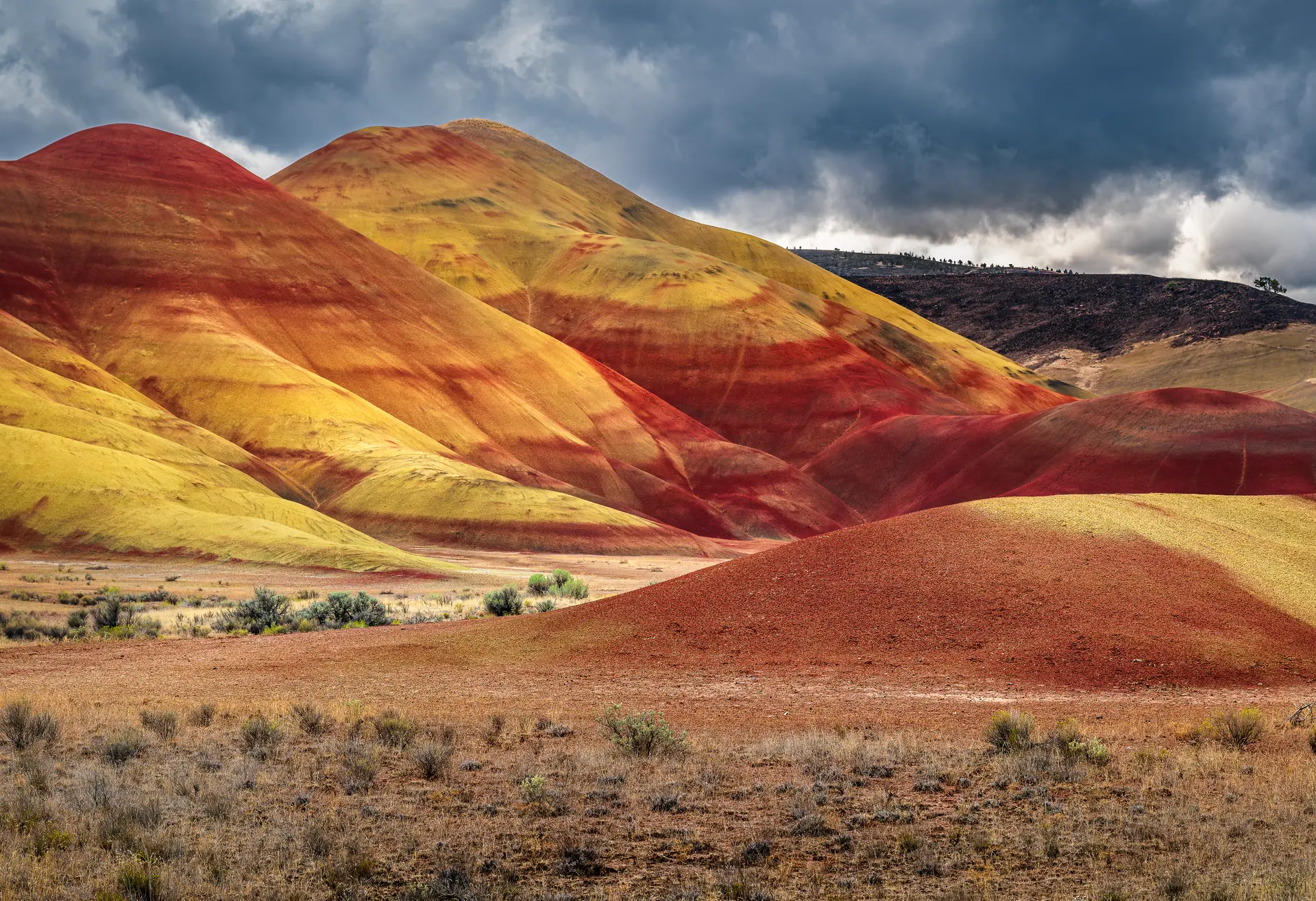
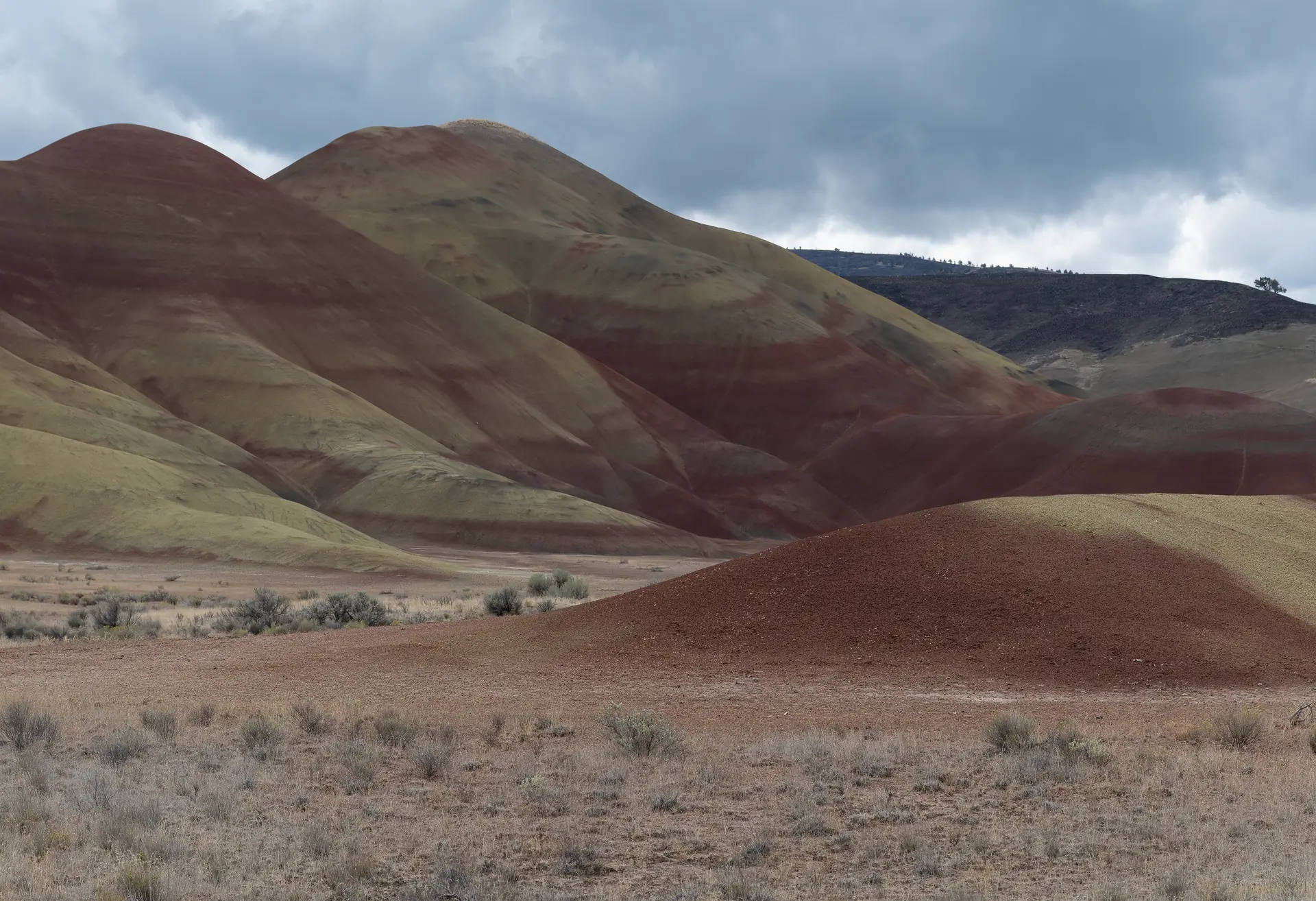
Out of the camera, this Painted Hills raw was flat and grey, and the bands on the hills looked like mud. Instead of dragging sliders, the brief went to Claude the way you'd explain it to an editor sitting next to you: a stormy sky that shouldn't turn to a grey smear, patches of sun that should glow, reds that still look like dirt. And no HDR look.
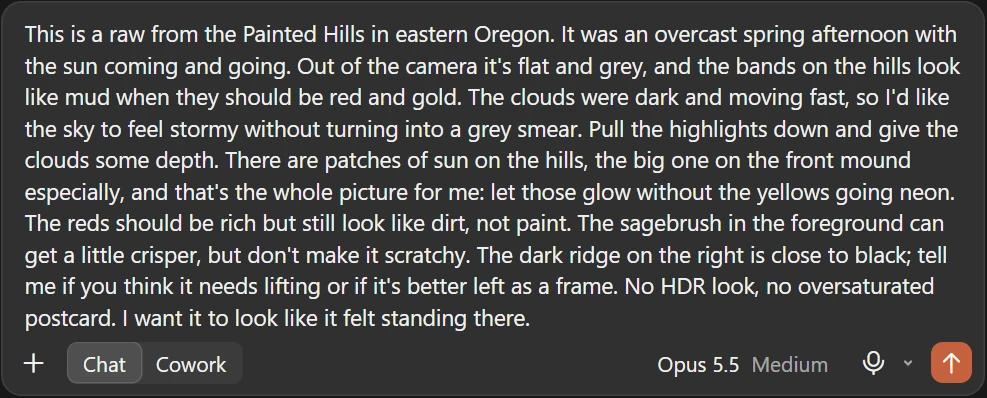
The brief typed into Claude Desktop: a Painted Hills raw, flat and grey; keep the sky stormy and give the clouds depth, let the patches of sun glow without the yellows going neon, rich reds that still look like dirt, slightly crisper sagebrush, and a question about whether the dark ridge needs lifting. No HDR look, no oversaturated postcard.
The whole brief, typed into Claude Desktop
Before: the Painted Hills raw straight from the camera, the banded hills flat and muddy under a grey sky.
Before · straight from the camera
After: the same raw edited in Lightroom, the red and gold bands of the hills glowing under heavy storm clouds, the sagebrush crisp in the foreground.
After · the same raw, edited in Lightroom

The clouds have depth again, and the bands come back red and gold. The patches of sun glow without the yellows going neon, and the reds still look like dirt. None of it's a filter or a preset. It's Lightroom's own sliders, and every one of them is still sitting in the Develop panel if you want to push it further.


While it works

You can watch every pass

A small panel in Lightroom shows what it's doing and why. Before the first pass it takes a snapshot, so Abort always puts the photo back. Each pass gets a fresh render, a look, and a measured change, and the engine won't let a slider jump too far at once.

Lightroom panel, pass 1 of 12: Claude is working, nothing needed from you; Accept, or Abort to put the photo back.
Pass 1 · nothing needed from you, and Abort puts the photo back
Pass 4: a new sky mask with four slider changes listed, and clipping within limits.
Pass 4 · a new mask on the sky, each change listed, clipping checked
Pass 8: green and aqua saturation each lowered by 10, with a note that aqua was held to plus or minus 10 this pass.
Pass 8 · the engine held a colour change to ±10 for this pass

Example two · variants

Not sure what you want? Ask for three

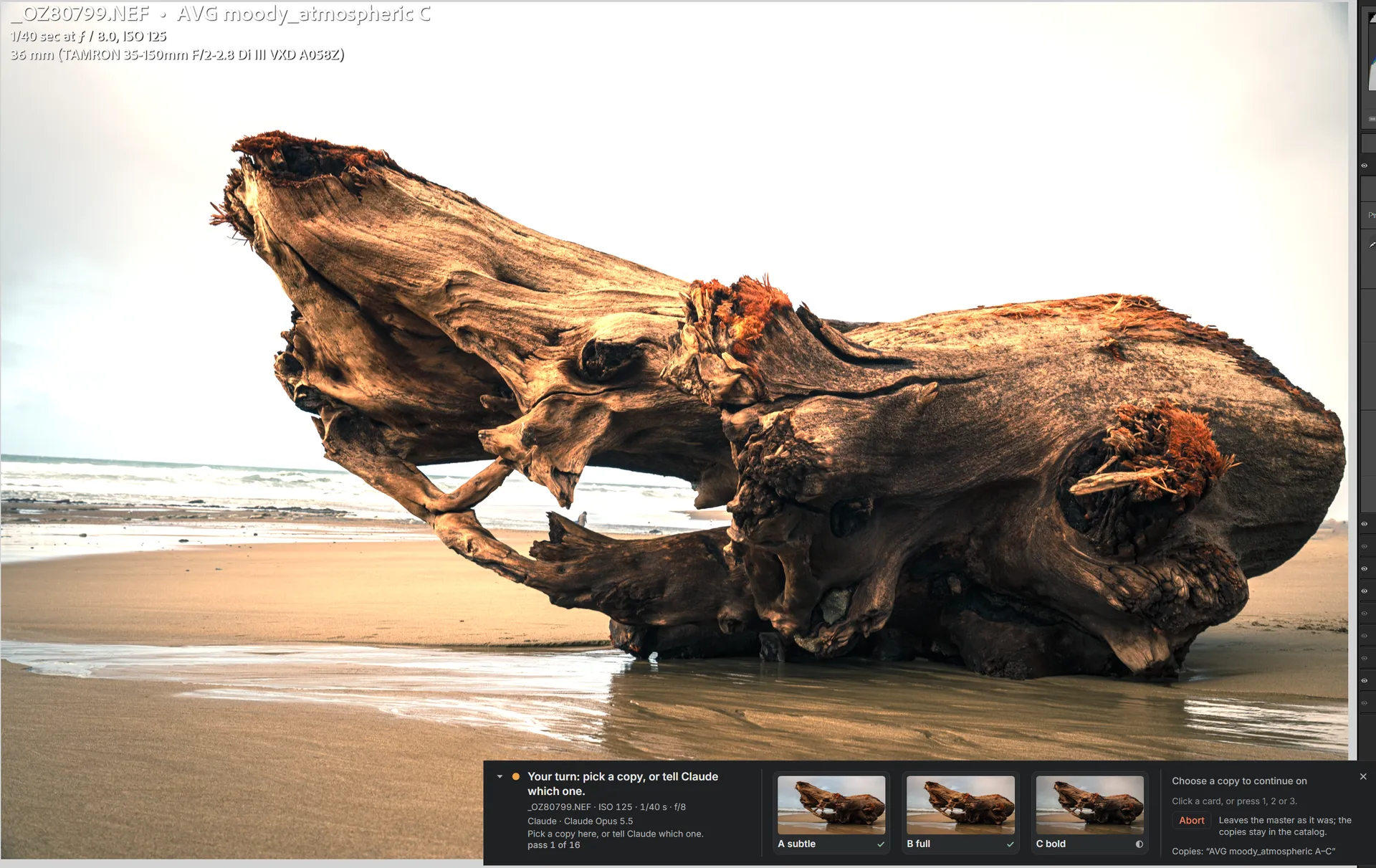
A different log on a different grey day, with a sky that came out of the camera almost white. Ask for variants and the engine makes three virtual copies, subtle, full and bold, and lays them out side by side. Pick one, and the rest of the passes go to it.

Lightroom with the panel asking you to pick a copy: three thumbnails labelled A subtle, B full and C bold.
Your turn: three copies, one click
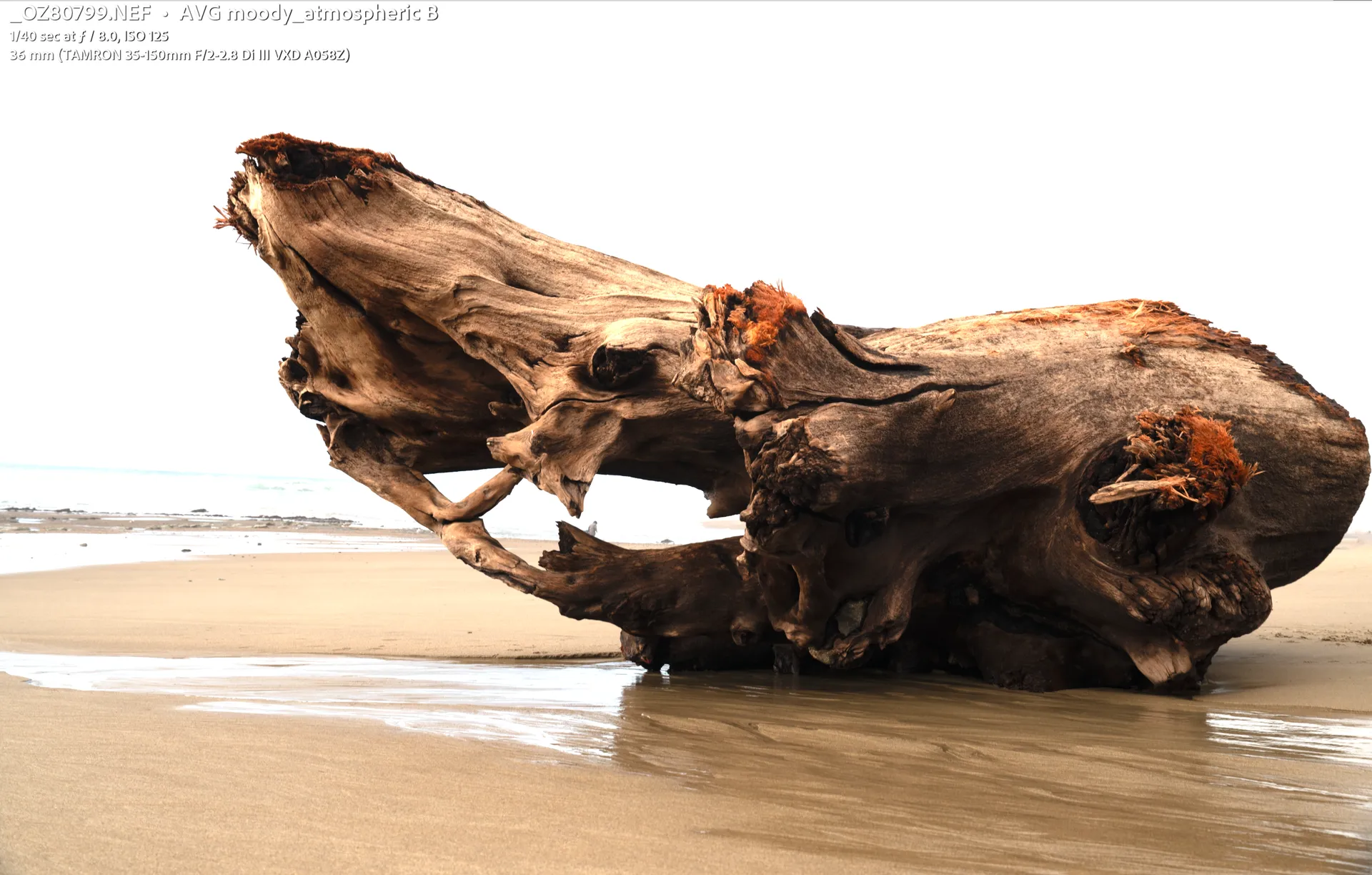
Before: a large driftwood log on wet sand under a nearly white sky.
Before
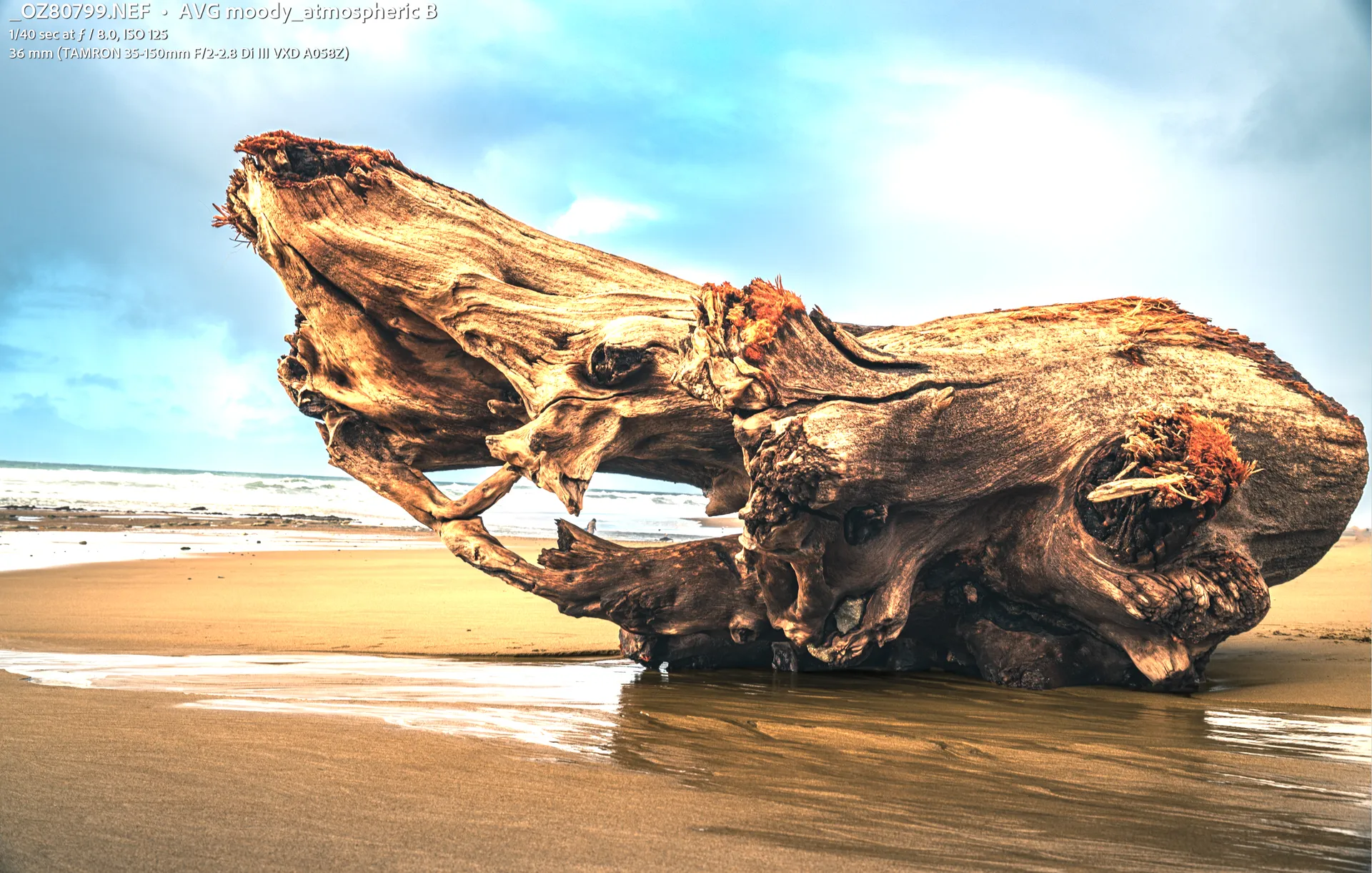
After, copy B: the sky recovered to blue with clouds, the log rich in warm detail, the wet sand reflecting.
After · copy B, finished

The copies you didn't pick stay in the catalog, so you can change your mind later.

What's in the box

AI apps
Any MCP client with a vision model. Claude Desktop is set up for you; Claude Code, OpenCode, Hermes Agent and Antigravity CLI are tested.
Looks
Eleven intents (golden hour, blue hour, forest shade, night sky, portrait, pet fur, black and white and more), and you can save your own
Passes
8 by default, and you can allow up to 16
Variants
Three virtual copies side by side. Pick one, and the rest of the passes go to it.
Clipping
By default, no more than 0.5% of pixels blown out and 1.0% crushed to black
Undo
Every pass is a named History step, plus a pre-session snapshot for each edit
Install
One setup: the Lightroom plug-in, the engine (an MCP server) and the Deck window
Origin
Started as a fork of Automaat/lightroom-mcp, and it's meant to work alongside it

Questions

Does it only work with Claude?

No. The engine's a standard MCP server, so any AI app that speaks MCP can run it, as long as its model can see images. The setup wires up Claude Desktop for you. Claude Code, OpenCode, Hermes Agent and Antigravity CLI have all been tested.

How well do other models do?

Some do very well. I got a really impressive edit from Gemini through OpenCode and the Gemini API. It wasn't cheap, though: that one photo used about $10 in API credits. On a pay-per-token plan, keep an eye on usage.

Does it change my original files?

No. Every edit is a Develop setting in your Lightroom catalog. Each pass is its own History step, and there's a snapshot from before the session, so getting back is one click.

What do I need?

Windows 10 or 11 (I've tested on 11), Lightroom Classic 15.0 or later (tested on 15.6), and an AI app with a vision model. The setup brings its own Node.js and doesn't need admin rights.

What leaves my PC?

The engine and plug-in only talk to each other on your machine, and they don't connect to the internet. To judge an edit, your AI app sends preview JPEGs to its provider, the same as any image you'd paste into a chat.

Which file types can it edit?

Anything Lightroom develops: camera raw, DNG, JPEG, TIFF, PSD, PSB, PNG, AVIF, JPEG XL and HEIC. Not video.

Is it free?

Yes. It's open source under the MIT licence.

It's free, and the code's all on GitHub.